Staff Editor

Uber inadvertently underpaid New York City drivers for over two years

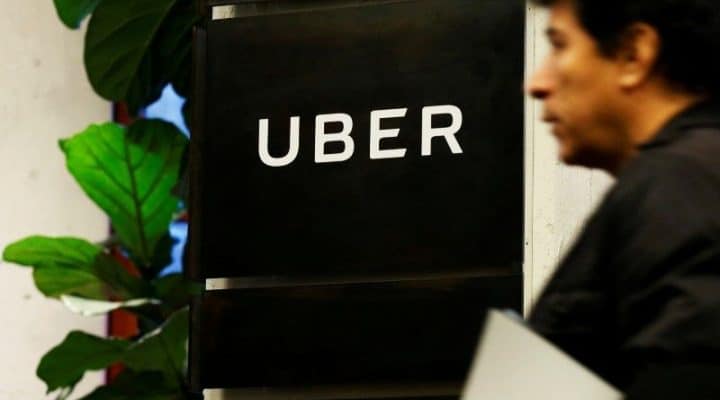
FILE PHOTO: A man exits the Uber offices in Queens, New York
FILE PHOTO: A man exits the Uber offices in Queens, New York, U.S., February 2, 2017. REUTERS/Brendan McDermid/File Photo

(Reuters) – Uber Technologies Inc [UBER.UL] said on Tuesday it underpaid its New York City drivers for the past two-and-a-half years, an error that could cost the ride-hailing company tens of millions of dollars.

Uber generally takes a commission from its drivers after deducting taxes and some fees, but it instead took a higher percentage from its New York City drivers using the full fare before accounting for sales taxes and fees, according to the Wall Street Journal, which first reported the news.

Uber usually takes a 25 percent commission from U.S. drivers under a November 2014 nationwide driver agreement, the report said.

The company could pay drivers back at least $45 million, averaging at about $900 per driver, the Journal reported.

“We are committed to paying every driver every penny they are owed – plus interest – as quickly as possible,” Rachel Holt, Uber’s regional general manager for U.S. and Canada, said via email.

All New York City drivers under the 2014 agreement would be eligible for a refund, regardless of whether they are still active or not, as long as they completed an Uber ride, the Journal report said.

The Independent Drivers Guild, which represents 50,000 drivers in New York City, on Tuesday called on regulators to investigate the payments practices of Uber and other ride-hailing apps.

The guild, in a statement, also called for an investigation into Uber’s use of the “upfront pricing” feature, which guarantees customers a certain fare before they book a ride.

Drivers have complained that the feature short-changes them while Uber gets the difference, the guild, which was set up last year with Uber’s help, said.

In January, Uber agreed to pay $20 million to settle claims by the U.S. government that it exaggerated prospective earnings in seeking to recruit drivers and that it downplayed the costs of buying or leasing a car.

Uber has been hit with a number of setbacks lately, including accusations of sexual harassment from a former female employee and a video showing Chief Executive Travis Kalanick harshly berating an Uber driver.

(Reporting by Aishwarya Venugopal and Sangameswaran S in Bengaluru and Heather Somerville in San Francisco; Editing by Sai Sachin Ravikumar)
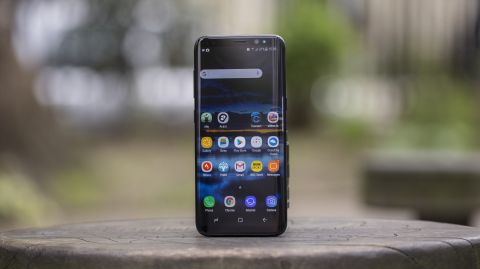
The new Samsung Galaxy does 27 things the iPhone doesn’t

Every spring, Samsung introduces a new Galaxy phone; every fall, Apple (AAPL) counterpunches with a new iPhone.

At the moment, we find ourselves in mid-cycle: Samsung has just released its Galaxy S8, and the iPhone 8 is still a summer away.

The S8 is a gorgeous phone. It’s a hardware masterpiece, it’s getting rave reviews, and—hey!—so far, nobody’s battery has exploded.

It’s also so crammed with features, it’s amazing the thing doesn’t weigh 20 pounds. That’s the Samsung way: Pile on features to see what sticks. Unfortunately, some of it’s garbage.

Top Nevada News: Bullfrog Gold Raises $816,000 Of Equity To Advance Its Nevada Gold Project

So here, as a public service, is a peculiar kind of review: A master list of features that the new Samsung has and the iPhone doesn’t—along with an assessment of which ones are actually useful.

1. The wraparound screen

Samsung’s S8 design goal was, “the most screen in the smallest space.” And sure enough: the side margins of the screen are gone completely—the screen image actually begins to curve around the side edges—and the top and bottom margins have been halved.

The result: Samsung’s screen shows 40% more than the iPhone 7’s—but the phones are the same width. (The screen is 5.8 inches diagonal on the S8, vs. 4.7 on the iPhone.)

That’s a little misleading, of course—the Samsung gets some of that extra screen area by being taller than the iPhone (.4 inches taller). In other words, it’s a weird shape—tall and skinny—that leaves you with black bars beside your videos.

Here’s what else is misleading: Samsung advertises a resolution of 2960 by 1440 pixels—much higher than the iPhone’s 1334 by 750. But in hopes of saving battery life, Samsung hides much of that high-res goodness. Out of the box, the phone comes set to 1080p resolution—only one-quarter of its potential sharpness. You have to fiddle with Settings if you want all the clarity you paid for.

In Focus: Is This Tiny Gold Mining Company The Next Big Thing?

But no question: it’s great to have so much screen. And such a great screen! Bright, colorful, gorgeous OLED.

  • Usefulness grade: A

2. Edge display

On the right edge, you can set up something called the Edge display. It’s a vertical bar, hugging the curved edge, that you can swipe inward to reveal a skinny pane of icons. You choose which icons appear here—favorite apps, speed-dial icons for your friends, news, and so on. Because this bar is available from within any app, it’s like an ever-present dock. Once you try it, you’ll use it constantly. It spares you all the trips to the Home screens. It’s really great.

This skinny bar at the edge of the screen gives you instant access to favorite apps and people.
  • Usefulness: A+

3. Video enhancer

The S8’s Video Enhancer mode gooses the contrast and brightness in video apps like Netflix (NFLX) and YouTube (GOOG, GOOGL). Honestly? Without seeing two S8’s side-by-side, it’s hard to see a difference. (It comes turned off, because it’s a battery drainer.)

  • Usefulness: B+

4. Gigabit LTE

The S8 and S8+ are the first phones that can tap into Gigabit LTE—a cellular network that’s supposed to give you much faster internet speeds.

It probably won’t affect you. Only T-Mobile (TMUS) has started upgrading its network to Gigabit LTE, and only in 300 towns. Sprint (S), Verizon (VZ), and AT&T (T) say they’re working on it.

(Gigabit LTE isn’t the same thing—nor as fast—as 5G, which will take a few more years to arrive.)

  • Usefulness: B

5. Iris recognition

You can now unlock your S8 by gazing into its camera lens; it recognizes the irises of your eyes, even if you have glasses on.

Also see: Is this the end to banking as we know it?

Most people don’t wind up using this feature, though, because it requires that you bring the phone up to eye level and hold it about 10 inches from your face; it’s just goofy and awkward. It also doesn’t work in bright sunlight.

Unlocking the phone with your irises is awkward, but handy when you have gloves on.

Unfortunately, the alternative secure unlocking method—your fingerprint—is a total disaster. Samsung put the fingerprint scanner on the back of the phone, directly beside the camera, so you get finger grease on the lens every time you unlock it. (The phone even warns you as much: “Be careful not to smudge the camera lens,” it says when you set up your fingerprints.)

That’s if you can unlock it—the scanner is a tall rectangle (not a circle, as on the iPhone), and you have to cover the entire thing to make it work. A design disaster all the way around.

  • Usefulness: C

6. Face recognition

The Galaxy can also unlock itself by recognizing your face. It’s fast, and doesn’t involve holding the phone like you’re trying to mind-meld with it.

Unfortunately, face recognition is neither reliable (it often doesn’t work) nor secure; for example, Samsung doesn’t consider it secure enough to use for Samsung Pay. People report being able to fool it with a photo.

You can’t use both iris and face recognition; you must choose one or the other.

Usefulness: B

7. Longer battery lifetime

Samsung says that the new S8 battery will last longer—not in hours per charge, but in overall lifetime of usefulness. After a year, the battery will maintain 95% of its charging capacity—up from 80%, on the Galaxy S7.

There’s no way to test Samsung’s claim without waiting a year or two, so we’ll have to take their word for it.

  • Usefulness: B+

8. Portrait mode

The S8’s main camera hasn’t been improved since the S7 came along—it’s a wicked great camera—but its software has.

For example, when you’re photographing a face, you can turn on a Portrait mode, which simulates the blurry-background effect you usually see only in pro photos.

This is not an optical effect; it’s basically a filter, and the phone sometimes gets it wrong. The blurring sometimes spills into your person. (On the iPhone 7 Plus, the similar Portrait feature relies on the phone’s two camera lenses, and is therefore more reliable.)

What’s cool, though, is that you can adjust the blur after shooting the picture. You can even blur the foreground, leaving the background sharp.

The S8’s blurring feature can soften focus of either the background or foreground, although the results can look phony.
  • Usefulness: B+

9. Snapchat-style overlays

The Camera app can now add goofy, Snapchat-style animated costumes to your head. They’re pretty awful. Stick to Snapchat (SNAP) or MSQRD.

Usefulness: D

10. “Virtual” photos

Within the Camera app, there’s a new option: You can walk around an object, “filming” it. Later, you can “play it back” by swiveling the phone around in space, changing your angle on the subject. Convenient if you’re shopping for sculptures, I guess.

The Camera app is full of tricks, like Snapchat-style video overlays (left) and 3-D walkarounds of objects (right).

Usefulness: C

11. HDR certified

The S8 is the first smartphone with an HDR-compatible screen. That’s high dynamic range, and it means that, if you can find an HDR movie to watch, you’ll see it with more vivid colors and a greater range of brights to darks.

So far, there’s not much to watch. Netlix’s HDR movies don’t yet play on the S8 (and would require a more expensive streaming plan if they did). Amazon Prime’s HDR movies do, but there are only a handful of them.

Usefulness: D

12. Enhanced front-facing camera

The camera above the screen now captures 8-megapixel photos with an f/1.7 lens, and can autofocus now. Good stuff, though not an earth-shattering improvement over the iPhone 7’s front camera (7 megapixels, f/2.2 aperture).

Usefulness: B

13. Bluetooth 5

Bluetooth 5 has four times the range and twice the data rates of Bluetooth 4—but you get those benefits only if you’ve upgraded your Bluetooth stuff (speakers, Fitbits, headphones, etc.) to Bluetooth 5 gear.

Even now, though, the S8 lets you pair with two existing Bluetooth headphones, so you and a friend can listen simultaneously.

Usefulness: B+

14. Split screen

The S8 introduces “multi window,” a feature that lets you split the screen between two apps, side-by-side (or top-and-bottom). At that point, you can adjust their relative sizes, or copy between them.

Two apps, one screen.

It’s slick, but getting there takes some learning—and, unfortunately, it’s available only in some apps.

Usefulness: B–

15. Bixby voice control

Bixby is Samsung’s version of Siri or Google Assistant. It’s so important, it gets its own dedicated button on the left edge of the phone—which you can’t reassign to another function.

Which is too bad, because at the moment, Bixby doesn’t do anything. It doesn’t take spoken questions, like Siri or Assistant does. Samsung says that’s coming soon. (Meanwhile, you can always use Google Assistant, which is still there.)

Samsung says that once Bixby is activated, it’ll be much smarter than Siri or Assistant—that you’ll be able to give it far more complex commands. For example, if you’re looking at a map, you can say, “Capture this and send it to mom.”

Samsung also says, though, that apps must be rewritten to respond to Bixby commands—and only 10 apps will be controllable in this way when Bixby goes live.

16. Bixby Home

A second feature, confusingly also called Bixby, is a nearly perfect copycat of Google Now: A scrolling list of “cards” that present information you might find useful right now, based on the time and your location: weather, appointments, headlines. Why is it necessary for a phone to have two copies of the same thing?

Bixby Home is a fairly pointless duplicate of Google Now.

That’s always been a downside of Samsung’s phones, which already come with two photo apps, two web browsers, and so on. Why bother duplicating Google’s good work?

Usefulness: D

17. Bixby Vision

Yes, there’s a third feature called Bixby. This one is built into the Camera app. You can point the phone at a landmark and see details about it, supplied by Foursquare; at a product to get shopping information, supplied by Amazon (AMZN); at any image to be shown similar ones, from Pinterest; at a wine-bottle label for ratings and details, from Vivino; or at foreign-language writing for a translation, supplied by Google Translate.

The best feature of the long-dead Amazon Fire phone lives on.

Last week, Google announced that the same feature is coming to Android. So once again, you’ll have two identical versions of the same feature.

  • Usefuness: B

18. Samsung Health

This new, surprisingly complete app automatically tracks your steps, workouts, and (if you have a Samsung smartwatch that you wear at night) sleep; it also offers places to manually record your weight, food, blood glucose, water, caffeine, and so on.

In a novel twist, the app also lets you have an instant video conference with an actual, board-certified doctor for $60 (courtesy of American Well), which your insurance may or may not cover—great for getting immediate help or refilling a prescription.

  • Usefulness: A–, if you’re into that sort of thing

19. Dex Station

For $150, you can buy a special dock that lets you connect your phone to a big monitor, mouse, and keyboard. Your phone becomes the CPU of a PC!

The long-dead Motorola Atrix lives on in the Dex.

Unfortunately, many apps don’t work right on the big screen, and there’s the whole question of, “Why?”

  • Usefulness: C

Older Features

Many of Galaxy’s features aren’t new in the S8, but are still unmatched by the iPhone. A few examples:

20. Cool gestures

The Galaxy phone is the shortcut lover’s idea of heaven. You can turn on all kinds of super cool gesture-based shortcuts, like these:

  • Swipe the fingerprint reader to open Notifications
  • Smart Stay (the screen stays on as long as you’re looking at it)
  • Press the Power button twice to fire up the camera
  • Wipe the edge of your hand across the screen to take a screenshot (which you can then annotate or crop)
  • Direct Call (hold the phone to ear to auto-dial the person whose card is on screen)
  • Smart Alert (when you pick up the phone, it vibrates if notifications are waiting)
  • Easy Mute (silence the ringer by placing the phone face down—in a meeting, say)
  • Send an SOS to designated contacts (press the Power button three times)
  • Answer a call by pressing the Volume Up key
  • During video playback, drag up/down for volume adjustments, left/right for brightness. Double-tap to pause.

These gestures erase a lot of the fussiness of trying to get things done on a tiny, no-mouse device.

  • Usefulness: A+

21. Quicker charging

The S8’s quick-charging technology (unchanged since last year’s model) gives you a full charge in about 1.5 hours, as long as the screen isn’t on. That’s about half the time of an iPhone 7 Plus.

  • Usefulness: A+

22. “Wireless” pad charger

You can charge your S8 by setting it onto a Qi charging pad (under $15). It takes twice as long to charge that way, but saves you the plugging and unplugging of a cable. Grab and go.

Rumor has it that the iPhone 8 will offer “wireless” charging, too.
  • Usefulness: A

23. Samsung Pay

Loop Pay was a phone dongle that could trick a credit-card reader into thinking that you’d actually swiped a card through it. In 2015, Samsung bought Loop and built its technology into its Galaxy phones.

It’s hard to believe. You wave the phone near the card-reader slot, up to a couple of inches away, and — beep!you’ve just paid.

This is nothing like Apple Pay and Android Pay, which work only at checkout terminals that have been upgraded to work with them. In the big picture, there just aren’t very many places to use Apple Pay and Android Pay.

But Samsung Pay works almost everywhere that fine credit cards are swiped—90% of all checkout counters.

  • Usefulness: A

Also see: Is this the end to banking as we know it?

24. Always-on screen

The phone’s screen never goes fully dark. When it’s “asleep,” you still see the current time, battery charge, and notification summaries.

The S8’s screen is almost never fully dark.

“Won’t that eat the battery up?” Yes, a few percent; you can turn the feature off if you like. But it’s kind of handy, especially if you use your phone as a watch.

  • Usefulness: A

25. Smart Unlock

This is an Android feature, not a Samsung feature, but it’s cool: You can set things up so that as long as the phone is in a certain place (like your home), within range of a certain Bluetooth device (like your Fitbit [FIT]), or on your person (based on your body motion), it won’t keep locking. You won’t need a password, fingerprint, or whatever to unlock it.

Obviously, you won’t turn this on if you work at, you know, the NSA. But when you’re alone at home, why shouldn’t you enjoy a little convenience?

  • Usefulness: A

26. Headphone jack

Yep. Samsung managed to create a waterproof phone without sacrificing the headphone jack. So much for Apple’s “courage.”

  • Usefulness: A

27. Expansion slot

You can outfit your S8 with a tiny micro SD card for additional storage—lucky, since there’s only one S8 model (with 64 gigs of memory). The memory-card thing isn’t quite as good as built-in storage, because the phone treats it as an external drive, and it’s up to you to manage which data and apps get stored in which place, and some apps can’t be on the card. But for photo and video storage—awesome.

  • Usefulness: A–

The counterpunch

Of course, the iPhone has a long list of its own exclusives, like stereo speakers, a pressure-sensitive screen (press harder for more options), an optical zoom on the camera (on the Plus), built-in storage options up to 256 gigabytes, and twice the storage (128 gb) for the same price.

Above all, there’s the software—iOS 10—and the Apple ecosystem. Apple’s gotten more feature-happy of late, but it’s still the world leader in simplicity and coherence. You would never catch Apple bloating up your screens with duplicate apps and junkware. Apple’s apps are far more consistent in design and operation. You’ve got the Apple Stores to visit for on-the-spot fixes and help. You’ve got the glorious flexibility of sending iMessages instead of short, limited texts.

And then there’s the tight integration between Macs and iPhones. You know: Copy some text on your phone, paste it one second later on your laptop. Read a web article on the subway on your phone, sit down at your Mac at home to see the same site. That kind of thing.

In a way, then, all of these comparison articles (including this one) are missing a key point. They’re interesting for monitoring the state of the art, but they shouldn’t be called, “Which one should you buy?” Moving from the Apple ecosystem to the Google/Samsung ecosystem, or vice versa is a big, expensive hassle that not many people undertake. You have to re-buy all your apps. You have to buy all new chargers. You have to do a lot of relearning.

But clearly, the Galaxy S8’s hardware is a beast. A huge leap beyond the iPhone 7. So the ultimate experience would be the hardware features of the Galaxy S8, running the software and ecosystem of the iPhone.

Well, who knows? If the rumors are right, we’ll be getting something like that in the iPhone 8.

How Google’s trying to make the mobile web look less ugly

MOUNTAIN VIEW, Calif.—The company responsible for a large fraction of the hours we while away on the web isn’t happy with how inefficiently we spend that time on our phones.

At its I/O conference here, Google (GOOG, GOOGL) touted the progress of Accelerated Mobile Pages, an ambitious initiative to remake the mobile web into a faster, lighter and less irritating medium—yes, even the ads that help pay for it. That is a laudable effort, and the web giant has a good story to tell so far. But it also needs to address lingering concerns about its intentions.

Top News: Bullfrog Gold Raises $816,000 Of Equity To Advance Its Nevada Gold Project

Amped up about AMP

The basic idea is to take the HTML code behind every web page and strip out the cruft: over-sized images, scripts that run redundantly in the background, and other junk that contributes nothing to the reading experience.

The results can be impressive—see how fast this post can pop onto your phone in AMP form?

At last year’s I/O, Google news head Richard Gingras said AMP pages load four times faster and use a tenth of the data of a non-AMP page. At a Wednesday evening presentation here, AMP lead Malte Ubl said better compression techniques allow images on AMP pages to need half as much data as a year ago.

Un-Related: Is This Tiny Gold Mining Company The Next Big Thing?

The AMP project only debuted in October of 2015, but now Google says more than 900,000 domains serve up over 2 billion AMP pages. At a “State of the Mobile Union” keynote Wednesday afternoon, Google product-management vice president Rahul Roy-Chowdhury noted recent support for the format by Twitter (TWTR) and China’s social-media platforms Weibo and Tencent. Tumblr, owned by this site’s parent firm Yahoo (YHOO), is joining them.

There are sound reasons for this. While AMP wouldn’t exist without Google’s backing, it’s an open-source project that anybody else can use and revise—unlike proprietary fast-mobile-web efforts at Facebook (FB) and Apple (AAPL), Instant Articles and Apple News, that allow less flexibility. The British newspaper the Guardian recently dropped both Instant Articles and Apple News because they didn’t help it convince readers to sign up for paid memberships.

Also see: Is this the end to banking as we know it?

“We’re bullish,” e-mailed Jason Kint, CEO of online-publishing trade group Digital Content Next. “Google AMP is a very promising as a strategy to protect the open web from the suffocation of Facebook’s closed platform business model.”

Address angst

Kint, however, voiced wariness about how Google can push AMP pages before others, even if they may be svelte in their own right. Its mobile news search displays AMP pages first in a carousel of thumbnail previews you can easily flip through.

“Google Search on mobile nearly requires participation in AMP if you want to be discovered,” he noted.

An optional AMP feature yields another complication: a Google caching service that delivers pages even faster leaves them appearing at a google.com or ampproject.org address that can confuse users. For instance, my post about the upcoming Android O release appears not at the usual finance.yahoo.com domain name but at a much longer address that starts with “www.google.com/amp/s/www.yahoo.com.”

At a Wednesday evening presentation, Google representatives acknowledged this frustration and said AMP pages served from the company’s cache now include a banner with the correct address, which you can tap and hold to copy for sharing elsewhere.

Google is also moving to revise that cached address so it starts with the domain name of the original site—yahoo.ampproject.org, for instance. And publishers may have other options: In January, the web-hosting company CloudFlare announced its own AMP caching service and said it’s working on ways to keep pages at the right address.

Mobile ads you may not hate

A presentation Thursday morning covered another aspect of AMP you may not want to admit to appreciating: less annoying ads.

Google software engineer Michael Kleber explained how AMP ads can’t move around on a page or block its content, can’t hold up the rest of the page from loading, and can’t play video automatically. They also must run in a “sandbox” that quarantines any hostile code and can be closed by the page if it bogs down everything.

This doesn’t limit AMP ads to being simple banners. A demo showed how this stripped-down code can allow for an ad in which the content changes as you scroll down the page, highlighting various parts of a car.

Kleber also cited studies showing that AMP ads get seen and clicked through more. He cited a series of ads from the firm TripleLift on Time, Inc. (TIME) sites that were three times lighter and six times faster to load than non-AMP versions, and which generated 13% more revenue.

As somebody who writes for a variety of ad-supported sites, that sounds pretty good.

But remember that the AMP spec doesn’t ban ads that are light, efficient and repellent. You can use this format to crank out sleazy “around the web” clickbait ads (if you want to make your eyes bleed, read Amanda Hess’s New York Times recap of clicking through dozens of them) and spam people with creepy “retargeting” ads trying to get them to complete purchases contemplated on other sites.

AMP also can’t force desktop sites to shape up their act, even if well-done AMP sites start to make them look like hot garbage in comparison. Memo to web designers and publishers: Mobile users aren’t the only people online who don’t want their time or bandwidth wasted.

Best Buy Hates That It Is Too Complicated to Buy an $800 Apple iPhone in Its Stores


Best Buy
(BBY)  wants to get people in and out of its stores with a pricey new Apple (AAPL) or Samsung smartphone as fast as possible.

“[We are] revamping the mobile departments in our stores and enhancing the online presence at BestBuy.com to create a better, easier, more seamless shopping experience for customers,” Best Buy’s John Vomhof Jr. wrote in a blog post Saturday. The project, called “Mobile 2020” internally, has been in the works since last year and “will roll out to hundreds of stores over the next few months.”

The planned in-store initiatives include adding “specially trained employees” to help customers pick among phone products, “updated vendor and carrier experiences” and special attention paid to the fast-growing prepaid and unlocked phone categories. Also demystifying the smartphone-shopping experience will be “new menu boards, similar to those found at fast-food restaurants”, which are designed to show the latest promotions.

Newly revamped Best Buy phone department. Menu boards hang from ceiling. Source: Best Buy

E-commerce offerings will also be simplified on BestBuy.com; for some products, like the launch of the Samsung Galaxy S8 and S8 Plus last month, these upgrades are already in place. CEO Hubert Joly said on Best Buy’s earnings call on Thursday that the company “saw our highest-ever Android pre-orders” after they “simplified the buying experience and provided clarity of carrier offers and ease of phone selection.”

Shares of BestBuy surged Thursday after the company reported earnings of 60 cents a share, 50% above analysts’ estimates of 40 cents per share, with net sales of $8.53 billion also handily beating the $8.28 billion analyst forecast. Online was a predictable bright spot, with sales up 22.5%, compared to same-store U.S. sales growth of 1.4%.

“Potential performance pressure points were evident during the quarter, including delays in income tax refunds and hhgregg’s bankruptcy and still-ongoing liquidation; however, Best Buy successfully avoided the trap of chasing low quality/margin sales,” said Moody’s retail analyst Charlie O’Shea in a research note.

Joly said on the call that the hhgregg liquidation could put $2 billion in home goods and appliances sales up for grabs.

Best Buy, like retail peers Target (TGT) and GameStop (GME) , also benefited from the release of the hot Nintendo (NTDOY) Switch.

Red-hot tech stocks are getting a boost from an unexpected source

That’s been the logic employed by tech stock bears who have thrown in the towel on short positions over the last year. And the buying volume that results from what’s commonly referred to as a “short squeeze” has been a crucial driver of tech gains during the period.

What’s more, active managers have actually slightly decreased exposure to the so-called FANG stocks (Facebook, Amazon, Netflix, Google) that have recently gotten the lion’s share of credit for stock gains not just in tech, but also the entire stock market.

Top News: Bullfrog Gold Raises $816,000 Of Equity To Advance Its Nevada Gold Project

Related: Is This Tiny Gold Mining Company The Next Big Thing?

That makes the role of short covering as a driver of share appreciation even more notable, according to strategists at Bank of America Merrill Lynch.

The heavily-weighted FANG group has returned almost 30% so far this year, while the S&P 500 has climbed 8%. Just last week investors poured $1.8 billion into the largest exchange-traded fund tracking the tech sector, the biggest inflow in almost seven years.

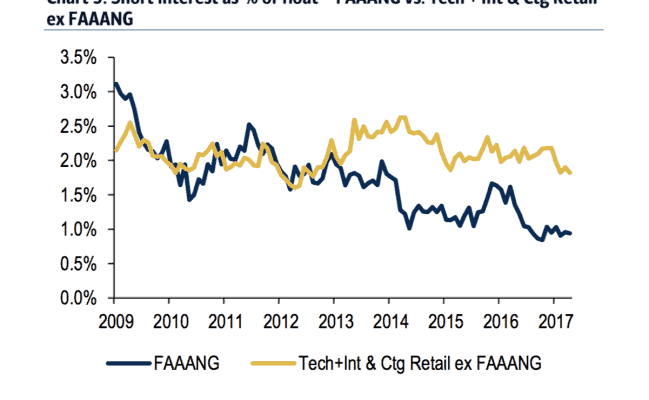
The covering of bearish positions can be seen when looking at short interest as a percentage of float for FANG stocks, plus Adobe and Broadcom, which have been identified by BAML as showing similarly robust sales expansion and long-term growth potential. The group — called FAAANG — has seen its level of shorts decline as positions have been closed.

5 30 17 faaang short interest COTD

(Bank of America Merrill Lynch)

While short covering has clearly been instrumental, no discussion of tech strength is complete without a mention of the sector’s torrid earnings growth. The group boasts the best profit expansion in the S&P 500 at the moment, excluding energy, and is projected to see earnings increase by 19% for the full-year 2017, while the broader benchmark is expected to see ex-energy growth of just 9.2%, according to data compiled by Bloomberg.

Also see: Is this the end to banking as we know it?

Still, amid all this talk of FANG & Co. and earnings growth, not all tech stocks are so loved by investors. Companies like IBM, Xerox and Yahoo are now more underweight by fund managers than at any point since 2008, according to holdings data compiled by BAML.

Oil Strategist Says OPEC Won’t Hold U.S. Hostage

In today’s “Futures in Focus,” Todd Horwitz, chief strategist at Bubba Trading, and Bloomberg’s Vonnie Quinn examine the impact of OPEC and the U.S. dollar on the oil market. They speak on “Bloomberg Markets.”


Don’t Miss: