
Archives for May 8, 2018

Better Buy: Under Armour Inc (UA) vs. Adidas AG/S ADR (ADDYY)

For the longest time, Under Armour (NYSE: UA) (NYSE: UAA) could do no wrong. It produced quarter after quarter of 20%-plus sales growth and seemed like it would eventually overtake the athletic apparel world.

Then a series of decisions derailed the company: It began offering its wares at discount stores and investing heavily in wearable technology with little to show for it, and shares plunged. The whole time, Adidas (NASDAQOTH: ADDYY) churned along, offering up new retro brands while seeing its stock more than triple since September 2015.

Sprinter on the start line of the track before the dramatic sky.

But recently the tables seem to have turned. Under Armour released an earnings report that, while not outstanding, offered hope for the future. Does that mean that its stock — down over 60% from its all-time highs — is the better buy today? While we can’t answer that with 100% certainty, let’s look at the question through three different lenses.

Sustainable competitive advantages

For long-term, buy-to-hold investors, there’s nothing more important to evaluate than a company’s sustainable competitive advantage, often referred to as its moat. In the most basic sense, a moat is what separates one company from another, and keeps customers coming back for more, year after year, while holding the competition at bay for decades.

In the world of athletic apparel moats are famously narrow, and provided almost solely via brand value. For a long time, Under Armour benefited from a very strong brand. But that brand has been tarnished by management’s choice to offer clothes at discount retailers, thus shedding the premium association many had with the company.

Adidas, on the other hand, has recently proven adept at building strong brands. The company’s line of shoes and direct-to-consumer focus are landing it far ahead of Under Armour in North America. Forbes estimates that the Adidas brand is the second-most valuable brand in the world, worth about $8 billion. Under Armour didn’t make the list.

Winner = Adidas

Financial fortitude

Next we have financial fortitude. Here we want to asses how a company would fare if an economic crisis hit right now. There are three basic designations, all derived from former trader and best-selling author Nassim Taleb’s writings:

Fragile companies often have much more debt than cash, and could lose market share and even go bankrupt as a result of an unforeseen crisis.
Robust companies have moderate levels of cash and debt, with healthy free cash flows. Though they might suffer in the short-term from an economic crisis, they will emerge largely unscathed.
Antifragile companies have lots of cash, little debt, and reliable free cash flow. They can actually grow stronger during a crisis by buying back shares on the cheap, acquiring rivals at a discount, or bleeding the competition out by undercutting on price.
With that in mind, and remembering that Adidas is valued at almost seven times the value of Under Armour, here’s how they stack up.

Company                                Cash                           Debt                                         Free Cash Flow
Under Armour                     $283 million                  $759 million                     $43 million
Adidas                                   $3 billion                             $1.4 billion                     $1.4 billion

Data source: Yahoo! Finance. Cash includes short- and long-term investments. Free cash flow presented on trailing twelve month basis.

This is a very clear and easy decision: Under Armour has an enormous — if improving — debt load. That makes the company very vulnerable to short-term problems. Adidas, on the other hand, has very healthy cash flows and a manageable balance sheet.

I would call Under Armour “fragile”, while Adidas is somewhere between “robust” and “antifragile”.

Winner = Adidas

Valuation

Finally, we have the murky science of valuation. While there’s no single metric that can offer a complete picture for how “expensive” or “cheap” a stock is, we can consult multiple data points to assemble a fuller picture.

Company                                    P/E                          P/FCF              PEG Ratio       Dividend     FCF Payout
Under Armour                           97                              174                     3.6                         N/A          N/A
Adidas                                       37                                   36                          1.7                      1.3%           41%
Data source: Yahoo! Finance, YCharts. P/E reflects non-GAAP results when applicable. N/A = Not applicable

Here again we have a clear winner. Adidas is not only cheaper on every metric, but it also offers shareholders a modest — but very sustainable — dividend.

Winner = Adidas

And my winner is…

So there you have it: Adidas wins in a clean sweep. The company’s brand is currently stronger than Under Armour’s, it has a stronger balance sheet, and it’s more favorably priced.

However, I wouldn’t want to own either stock — which is why I’m not giving Adidas an out-perform rating on my CAPS profile. While the company has definitely done a great job executing lately, the moat provided by brand strength isn’t super-wide, and can be very fickle. Trading at over 35 times earnings and free cash flow, it’s just too expensive for me.


Better Buy: Costco Wholesale Corporation vs. Target

Costco Wholesale Corporation (NASDAQ: COST) and Target (NYSE: TGT) are two of the biggest retailers in the country. Together, they represent $125 billion in market value.

Both companies exemplify the American big-box store, selling a wide variety of products from groceries to electronics to home goods, and both focus on higher-income, urban customers as opposed to rivals like Walmart. The two retailers are also continuing to bet on the brick-and-mortar channel by opening new stores, bucking the broader industry trend as many of their peers are closing stores or investing in e-commerce or their current store base instead of adding new locations.

A view of Costco’s entrance from the parking lot

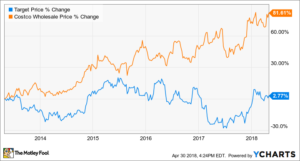
As stocks, Target has outperformed Costco over the last year as shares of the red-lettered retailer have jumped 30%, but that seems to be more a result of low expectations — with a number of retailers surging at the end of last year as the overall retail sector had a better-than-expected holiday season. Over any longer time horizon, Costco has outperformed Target as the chart below shows.

TGT data by YCharts.

Let’s take a closer look at what each company has to offer today to determine which stock is the better buy today.

Riding the membership model

Naysayers keep calling Costco’s future into question. Millennials won’t shop there, they argue, or they see it as an inevitable victim of Amazon Prime, which continues to grow like wildfire. Costco CFO Richard Galanti added credence to those concerns a couple of years ago when he said his biggest concern was, “Everybody in the world never wanting to leave their house and only typing stuff to order and get it at the front door.”

However, despite those concerns, Costco continues to put up comparable sales growth that is virtually unseen from any other brick-and-mortar retailer. Through the first 31 weeks of the fiscal year, comparable sales were up 6.5%, excluding fuel prices and currency exchange, and have increased 7% in the U.S. Last year, the company stepped up its e-commerce efforts, partnering with Instacart to deliver perishables, and began offering free two-delivery on nonperishables for orders over $75. Those initiatives seem to be paying off as e-commerce sales are up 32.4% in the fiscal year to date.

In addition to those numbers, Costco’s membership model gives it an advantage over the average brick-and-mortar retailer like Target as it keeps customers within its ecosystem, and gives it a revenue stream in addition to the retail business. In fact, the majority of Costco’s profits comes from membership fees, and last year renewal rates were 90% in North America and 87% globally, indicating its service still remains popular, despite alternatives like Amazon Prime.

The entrance of a Target store

Hitting the bull’s-eye

At Target, meanwhile, the past year’s 30% gain hasn’t been an accident. Comparable sales growth in the retail business went from negative to positive, and the company made a potentially groundbreaking acquisition with its purchase of Shipt, the Instacart competitor, which will help Target provide same-day delivery from most of its stores by the end of the year.

In the fourth quarter, Target showed off 3.6% growth in comparable sales, with growth in both its stores and the online channel. Digital sales increased 29% in the period, but adjusted earnings per share slipped from $1.45 to $1.37 as the company increased spending with wage hikes and an uptick in selling, general, and administrative expenses. The decline in earnings per share shows that Target is still in the investment phase of its turnaround plan.

However, for the current year, Target sees adjusted earnings per share of $5.15-$5.45, up from $4.71 last year with the help of the new tax law, and a low-single-digit increase in comparable sales. In other words, after struggling for years to define its brand in the changing retail landscape, Target seems to be finally figuring it out. That expected profit growth is the main reason for the stock’s recent surge.

The key numbers

Even with Target back to profitable growth, Costco is still growing faster. The warehouse chain has seen earnings per share increase 26% so far in this fiscal year, aided by the new tax law, while Target’s expected EPS growth of 12.5% at the midpoint of its range is also inclusive of tax reform benefits. In comparable sales, Costco is growing considerably faster than Target as well.

Given Costco’s faster growth and advantage from its membership model, the warehouse retailer’s stock unsurprisingly trades at a higher P/E ratio, at 29.8 compared to just 15.4 for Target. Dividend investors should also note that Target offers a higher yield than Costco, at 3.5% compared to 1% for Costco. However, Costco has paid a number of special dividends in recent years, meaning investors have reaped more rewards than that 1% yield indicates.

Based on the companies’ current positions and valuations, I think Target has more upside potential of the two stocks. Costco, though, is the better buy of the two as it’s considerably less risky. Costco has a stronger economic moat than Target and its fast comparable sales growth has shown it can withstand the threat from Amazon. Despite Target’s recent results, I’m not yet convinced that it can return to full-fledged earnings growth. Costco is the more reliable investment here.

Facebook Won’t Monetize Its Forthcoming Dating Service With Ads

Social networking behemoth Facebook (NASDAQ: FB) is getting into the dating game. Earlier this month at its annual F8 developer conference, the company announced its plans to create a new dating service that would allow users to hopefully find romantic partners. The news has significant implications for dating service incumbents like Match parent IAC, which saw its shares tumble following the revelation.

It’s almost surprising that it took Facebook so long to release such a service, given its natural strengths in connecting people and building relationships. From an investing perspective, the big question is how Facebook hopes to monetize the new offering.

Woman looking at her phone with hearts coming out of it

“Can I get your Facebook dating profile?”

Recode reported some new details yesterday regarding how the service will work. Users will create separate profiles specifically for the dating service, which will be tied to their primary Facebook accounts. The platform will leverage what it knows about you in an effort to match users with other singles, including things like location or other shared interests. There will even be a new dedicated text-only messaging service within the dating service that is independent of WhatsApp or Messenger. Facebook expects to start testing the service within a matter of months.

Importantly, Facebook has confirmed that it has no intention of monetizing the free dating service with ads, or using any data collected from the service for ad targeting.

The strategic importance of side businesses
This is probably the scariest news for incumbent rivals that have built businesses on dating services, as most online dating platforms charge various types of fees. It’s also true that the subscriber bases of these dating services pale in comparison to Facebook’s global monthly active user (MAU) base of 2.2 billion, many of which will certainly try out the new service since it will be offered at no additional cost.

However, many tech giants enjoy a certain luxury: They don’t need to make money on side businesses as long as those segments provide strategic benefits to their core operations. For example, Facebook’s Marketplace section, which is comparable to Craigslist, is similarly free. Facebook doesn’t charge for users to list classifieds and does not get a cut of any resultant transactions as it doesn’t facilitate payments in any way, either.

Like Marketplace, to the extent that a dating service strengthens user engagement of the core service, which in turn supports the advertising business indirectly, then it’s worth it. Rivals should be utterly terrified.

Caterpillar Gains After Clarifying ‘High Water Mark’ Comment

Caterpillar management said at the Wells Fargo Industrials Conference that the “high water mark” comment from the first-quarter earnings call wasn’t meant to suggest that markets are peaking. Shares rose as much as 1.3 percent in pre-market trading.

“All we meant was that we had an exceptionally strong first quarter,” Caterpillar’s management added.

Shares of Caterpillar sank 6.2 percent on April 24 after the “high water mark” comment suggested to some market participants that the company saw a peak in the cycle.

How to use Google Docs

Whether you’re a student or a working professional, chances are you’ll need to use a document creation program at some point. Depending on your field, you may need to know one really well, or at least be able to utilize a few of its lesser-known features. Thankfully, unlike Microsoft’s renowned counterpart and some of the other alternatives, Google Drive offers a large buffet of productivity apps and features free of charge. Learning the ins and outs of Google’s answer to Word can take time, however, assuming you have no idea how to navigate the suite.

There’s no need to fret, however! This guide will walk you through the many facets of Google Docs, so you can create a document, collaborate with others, and edit your work in no time. Read on for all the details, or check out our guide on how to use Google Drive if you’re looking to make the most of Google’s entire arsenal.

Step 1: Setting up your Google account

Using Google Docs requires you to sign up for Google account. It’s free to do so, though, and your account also provides you with access to Gmail, Google Maps, and YouTube, as well as the entire Drive suite.

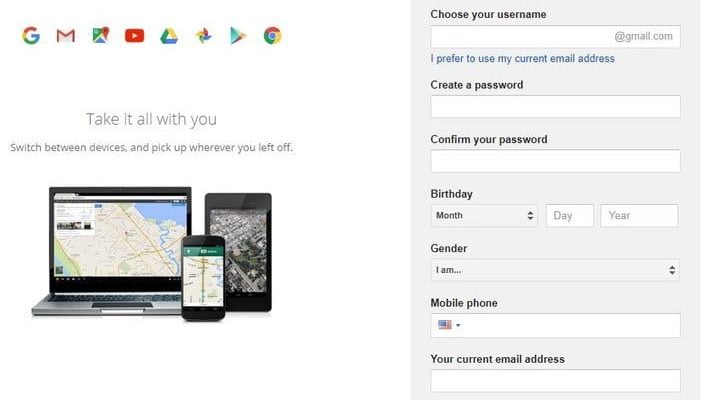
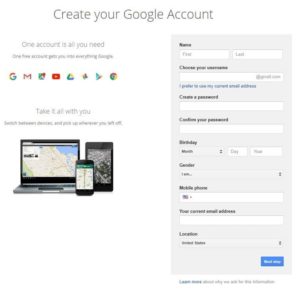
To create a Google account, navigate to the sign-up page. Enter your information — including your name, email address, and birth date — and click Next Step. Read the Privacy Policy and Terms of Service and hit I Agree. Congratulations! You now have a Google account. If you already have an account, just log in as you normally would.

how to use google docs create your account

Step 2: Launching Google Docs

There are several ways to access Google Docs, depending on your device. You can download the app from the App Store or Google Play, or click the Apps icon in the upper-right corner of the Google homepage (represented by nine squares). You must then click the Docs button — you may have to click More in the pop-up menu to see it.

Alternatively, you can navigate to Google Drive and select Docs within the My Drive menu at the top, or select Docs after you’ve clicked New on the right-hand side of the page. The last option is to navigate directly to Google Docs. Once you’ve launched the web app, you’ll be ready to create a document.

Step 3: Creating a document

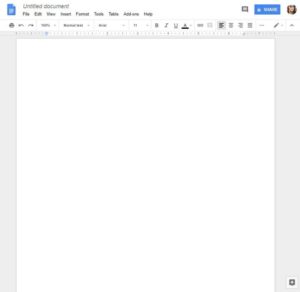
To make a new document, click the blank page with a blue addition sign inside it, which is located the upper-left corner of the main Google Docs page. If you can’t find this menu, scroll up or click the red arrow in the lower-left corner of your screen.

If you are creating a document from Drive, selecting Google Docs after hitting New will automatically create a blank document. If you click the small, right-facing arrow next to Google Docs, you can even choose to create a new document based on a provided template. There are a variety to choose from, including résumés, business letters, and a selection of third-party templates. You can even upload an existing .doc or .docx file to your Drive by clicking New, followed by File Upload.
Step 4: Start working

Once you’ve created a document, you can get to work. Click Untitled document in the upper-left corner to add a title to your document. You can also adjust the font type, text size, and much more via the toolbar at the top of the page. Clicking the three horizontal dots near the right side of the page will bring up some additional formatting options. If you can’t see your title or the menu bar at the top of the page, those options may be hidden. If that’s the case, click the downward-facing arrow in the upper-right corner to display them.

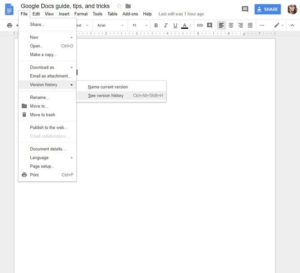
Since you’re working within your browser, any changes made to your document will be saved automatically. If you look to the right of the Help option at the top of the screen, you should either see Saving… or All changes saved in Drive. Wait for the second message to appear before exiting out, just to ensure all your work has been saved. To show the Version History of the doc at hand, click Saving… or All changes saved in Drive, which will allow you to review the changes.

How to share your stuff

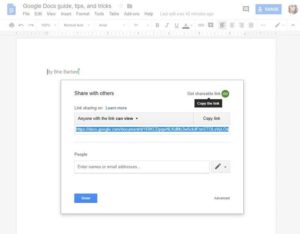
To share your documents with other people, click the blue Share button in the upper-right corner of the doc you wish to share. The button will be wedged between your picture — assuming you’ve added one to your Google account — and the comments icon. Afterward, invite other users by entering the appropriate email address in the resulting window.

People you share with can either edit, view, or comment on a document depending on what permissions you grant them. This can be changed by tapping the menu directly to the right of the empty address field. If you want to share the document with people using something other than email, click Get shareable link at the top of the Share window. A link will then appear directly beneath (it will also be copied to your clipboard).

If you click the Advanced button in the lower-right corner of this window, you can also share the file via Gmail, Google+, Facebook, or Twitter, but this will require you to make your document public. Google Docs sets the privacy settings to Private by default, but you can always click the blue Change button in the middle of the Advanced window (under “Who can access”) to adjust your privacy settings.

Use the comment and chat functions

With Google Docs, you can watch in real time as other people make changes to a document. By clicking the Comments button in the upper-right corner of your screen, you or anyone else who is in the document can start a discussion about your project. You can also see which users are currently looking at the document using the series of circles located to the left of the Comment button. If no one besides you is looking at a given page, nothing will appear here.

You can also set it so that you receive notifications when people make changes to the document, or when someone mentions your name or interacts with one of your comments. This can be a very useful tool for collaborating with large groups of people or a group that’s not in the same physical space. If for some reason you don’t want users to be given the option to add comments to a given document, you can also change the editing mode (more on that in the next section).

Get to know the various editing modes

Located directly beneath the Share button are options for viewing, suggesting edits, and editing documents. While the Editing option lets you make edits, Suggesting and Viewing allow you to suggest edits and view or print your document, respectively. The Suggesting option is similar to the Track Changes function in Word, and will denote any changes made to the document in green. This gives other users the option to approve or delete these edits before they become a part of the final document. Even if you’re not using the Suggesting mode, you can always view a document’s revision history by going to File > Version history > See revision history.

Google Drive has more to offer than just text documents. Slides, for instance, is Google’s version of Microsoft PowerPoint, while Sheets is the company’s take on Microsoft Excel. While not always as extensive as Office 365 in terms of functionality, the G Suite is a useful and convenient way to create content online, and is free to use once you have a Google account.

Don’t get too comfortable! At Build 2018, Microsoft showed plans to change Windows

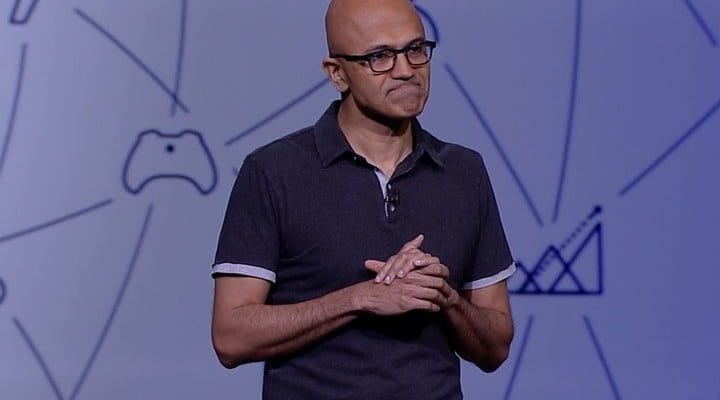
Microsoft’s annual Build conference for developers kicked off the week starting with a keynote provided by CEO Satya Nadella. He didn’t reveal any new hardware, but instead focused his presentation on solutions spanning from the intelligent cloud to the intelligent edge, the latter of which simply classifies everything we use ranging from smart thermostats to HoloLens in the corporate environment.

Microsoft Build: Day Two

While Build Day One focused on a general discussion about how the company wants to expand beyond Windows to working with any and all of the technology that its customers utilize, Day Two dug into some of the details its upcoming changes to Windows, Office, and the various tools and programs its making available to developers. Joe Belfiore, Microsoft’s Corporate Vice President in the Operating Systems Group, was the emcee.

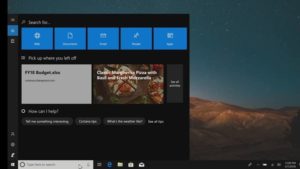
Digging through the Day Two keynote, we found a few tidbits hidden among the detailed technical jargon that might be of interest. First up are some changes that are coming to the Timeline and Sets features in Windows 10. Timeline is already operational in the recently released April Update, and it will eventually be enhanced with task suggestions pulled from the Microsoft Graph that prompt users to pick back up on important tasks from any device.
Sets is another Windows 10 feature that Microsoft is experimenting with and that will arrive on user desktops “someday,” and it’s focused on pulling all of the documents involved with a given task into a single window for easier organization and for more efficiently accessing them when returning to a task at a later time and on a different device. Belfiore showed off some new Sets features, including the addition of recent web browser tabs to the alt-tab key combo for easier access to internet content. In addition, Sets are stored in Microsoft Graph, meaning that there’s an ongoing record of tasks that can be accessed not only by users but also by various applications. And finally, Sets will show up in the Windows 10 Timeline, making them easier to access across time and across devices.


Microsoft introduced a new Your Phone app on Day One, and on Day Two it provided some additional details on how the app will allow users to access their phones on their Windows 10 PCs. A number of features were shown off, including the ability to not only view but work with Android notifications, drag and drop phone camera photos to Windows 10 apps, and to copy and paste a variety of different kinds of information between the devices. The Your Phone app will be available to Windows Insiders first, and will roll out to all Windows 10 users in a later build.

Microsoft’s Office suite was also covered on Day Two, with a few specific features highlighted during one of the coding sections. Microsoft Word, for example, will receiving new machine learning-driven grammar checking that will provide more subtle corrections and recognize grammar errors that the current grammar checking functionality misses. Next, Microsoft Outlook will be able to access Microsoft Pay.

Microsoft is also working to make the Windows Store a more lucrative option for developers. Key to that effort is a new revenue sharing model, which will pass 85 percent of revenues to developers when a user finds an app independently via Windows Store search and then purchases it, and a full 95 percent when a user buys an app after being directed to it by a developer’s own marketing efforts.

Finally, Microsoft introduced a new version of its Android launcher, Microsoft Launcher, this time aimed specifically at the enterprise. Launcher is a very popular app in the Google Play Store and brings a host of Microsoft-centric features to Android. The new Microsoft Launcher for Enterprise version will bring enhanced customization and security to organizations, and allows administrators to create desktops for specific users with feeds into specific line-of-business systems.

Microsoft Build: Day One

Nadella began the Day One keynote emphasizing how artificial intelligence is changing the world, drawing parallels to the Industrial Revolution where, in a span of 20 years, the nation moved from horse-drawn carriages to automobiles. The core technologies of the Industrial Revolution were essentially invisible: the combustion engines in cars, plumbing in buildings, the installment on electrical systems for lighting, and so on. Artificial intelligence and the cloud are just as revolutionary and invisible.

One example is Microsoft’s new partnership with civilian drone manufacturer DJI. Commercial drones will feature an integrated Azure IoT Edge component, enabling customers to deploy an artificial intelligence model developed in the cloud right to the drone itself in real time. Even more, that A.I. model can be deployed across the corporation’s drone army scattered across the globe in mere minutes.

In an on-stage demo, Azure Internet of Things director Sam George showcased an Azure IoT Edge-based smart camera produced by Qualcomm that detected a stress fracture stemming from a tank within a facility. A second camera discovered a pressure drop on the roof. That is where DJI’s drone comes in: Instead of sending a technician on a long, dangerous journey up to the roof, a company can simply send a smart drone to investigate and correctly identify the problem. Moreover, the drone can use the same A.I. model downloaded to Qualcomm’s camera. This advancement can save both time and money while keeping workers safe.

While that may sound like ho-hum news to the mainstream customer, Nadella eventually shifted his presentation to Cortana, Microsoft’s digital assistant for Windows 10. He said that Microsoft wants customers to get the most out of their devices and assistants, and not be bound by a single walled garden. In turn, the company wants developers to have access to the maximum amount of end users. With that, Nadella talked about Microsoft’s collaboration with Amazon to pair Cortana with Alexa.

To demonstrate the possibilities, Tom Taylor from the Alexa team and Cortana general manager Megan Saunders took to the stage. Saunders first told Alexa to add milk to her shopping list using Amazon’s Echo speaker, and then told Alexa to open Cortana. After that, Cortana took control of the device, allowing Saunders to check her calendar, and verbally send an email via Outlook to Taylor.

In turn, Taylor received the email on his Windows 10 PC, asked Cortana about the location of the dinner date, and then told Cortana to open Alexa. Amazon’s assistant then took control of Cortana’s space, allowing him to verbally schedule an Uber ride and turn off all Alexa-controlled lights. He even asked Alexa what she thought about her new friend, Cortana.

“I like Cortana. We both have experience with light rings, although hers is more of a halo,” Alexa said. Rimshot, please.

Another mainstream-friendly portion of Nadella’s keynote appeared in ways the company’s technology streamlines business meetings. It was called the Your Phone app for Android and an upcoming version of Windows 10. Instead of opening and unlocking your phone more than 100 times per day, you can simply see and reply to your phone’s notifications, messages, and photos within the Windows 10 PC app. Consider it as an upgrade to the current method of manually replying to messages through Cortana.

For instance, you can drag an image located anywhere on your Windows 10 PC and drop it into an SMS message within the app. If the recipient responds with an image, you can drag and drop the picture into PowerPoint and other programs installed on your PC. For phone notifications, you can open the equivalent Windows 10 app or view them on the internet.

Outside the Your Phone app, this portion of the keynote focused on using Teams, Office 365, and intelligent devices in the meeting. For instance, the smart device seated on the conference table recognized and bid good morning to all who entered the office space. The device also recognized who was speaking and rendered their spoken words within Teams. This eliminated the need for taking notes and provided a full transcript at the end.

At the end of his keynote, Nadella said Microsoft wants to empower more people and organizations. The technology needs to reach everyone, thus Microsoft introduced A.I. for Accessibility. It’s a grant program for developers, engineers, and more to create intelligent solutions for individuals with disabilities. A video showcased several A.I.-powered technologies that improve the lives of these individuals such as Soundscape, eye-controlled interfaces, Swiftkey symbols, and the learning tools just introduced in Windows 10 April 2018 Update.

Finally, Microsoft briefly revealed the public preview of its new Azure Blockchain Workbench. This platform allows developers to create applications that rely on an Azure-supported blockchain. This blockchain can be linked to Active Directory for easier collaboration and logins. Developers can also use Azure Key Vault to store keys and synchronize data between on-chain and off-chain storage and databases. Workbench even supports Microsoft Flow and Logic Apps.